

Time Tracker with Screenshots for Transparent Reporting
Visual proof-of-work and activity logging for productivity and compliance.
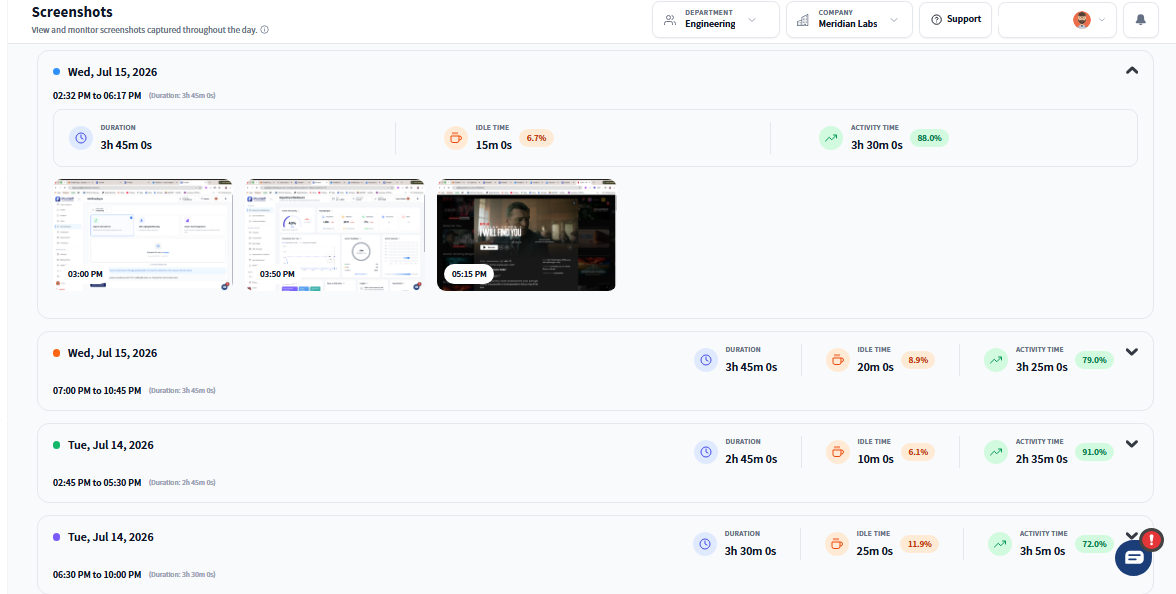
Why Screenshot Tracking Builds Trust, Not Suspicion
- Adds visual context to time logs for better insight
- Detects idle time and focus dips — no manual checks required
- Helps managers guide performance without disrupting workflows
- Empowers teams with role-based access and session-level transparency
- For Managers: Get clarity into task focus, improve time usage, and coach smarter with session-based insights.
- For Employees: Stay informed and in control — screenshots are transparent, role-based, and limited to active sessions.
What a Reliable Time Tracker with Screenshots Should Include
Optional Screenshot Capture
Visual proof without compromising trust.
- Time-stamped and project-tagged screenshots
- Linked to sessions, tasks, and trends
- Validates productivity for billing and reviews
Activity Level Tracking
Track activity through keyboard and mouse use
- Identify peak productivity hours
- Segment by user, task, or timeframe
- Spot disengagement trends early
Idle Time Detection
Detect when focus drops — and why.
- Inactivity flagged with real-time nudges
- Track natural breaks vs. distractions
- Use data to coach, not penalize
Role-Based Permissions
Secure visibility for the right stakeholders.
- Access levels controlled by team or role
- Employee-friendly transparency settings
- Built to maintain trust and privacy
Exportable Reports
Turn session data into business-ready insights.
- Filter by user, time, website, or task
- Export to Excel, CSV, or PDF
- Supports audits, and performance reviews
How Screenshot Capture Works in the Background
Screenshots are only captured during active sessions
Employees are notified if screenshot tracking is enabled on their team. Capture intervals are configurable per team or role.
Each image is linked to tasks and time blocks
No random captures. Everything is tied to deliverables, making accountability transparent and useful.
All data is securely encrypted and permission-gated
Managers and admins access only what’s needed — all images stay private and compliant.
Where Screenshot Tracking Fits Your Team
- 01
Agencies & Studios
Deliver visual proof-of-work for clients
- 02
Remote & Offshore Teams
Replace check-ins with real-time visibility
- 03
BPO & Support Centers
Ensure SLA-aligned productivity logs
- 04
Consulting Firms
Link screenshots to billable hours and task effort
- 05
Compliance-Focused Teams
Maintain audit-ready documentation for regulatory standards and internal controls
What Makes the Best Time Tracker with Screenshots?
| Feature | Prodaff | Typical Tools |
|---|---|---|
| Optional, role-based screenshots | Often forced or universal | |
| Task-linked image capture | Disconnected logs | |
| Privacy-first architecture | Stealth monitoring common | |
| Live activity + idle tracking | Basic timers only | |
| Exportable performance data | Limited reporting | |
| Transparent employee alerts | Often hidden |
Frequently Asked Questions
Screenshots are captured at set intervals during active, logged sessions only — not continuously and not during idle or break time — so you get periodic visual proof without constant recording.
Screenshot capture is configurable by role or department, so admins can enable it only where it's needed, like client billing or compliance-sensitive teams, rather than forcing it company-wide.
Yes. The free time tracker with screenshots trial includes the full screenshot feature, so you can evaluate image quality, frequency, and storage before committing to a paid plan.
Standard desktop time tracking software logs hours and tasks; this adds an optional visual layer — periodic screenshots — for teams that need extra verification for billing, audits, or compliance.
The best time tracker with screenshots for client-facing work pairs screenshots with exportable, task-linked reports, so agencies and consultants can hand clients both the hours and the visual proof behind them in one package.
Ready to get started?
Try Prodaff for free and see how easy it is to track time, boost productivity and manage teams with confidence.