

Idle Time Detection Software That Respects Focus
Monitor idle patterns transparently — and turn lost time into measurable improvement.
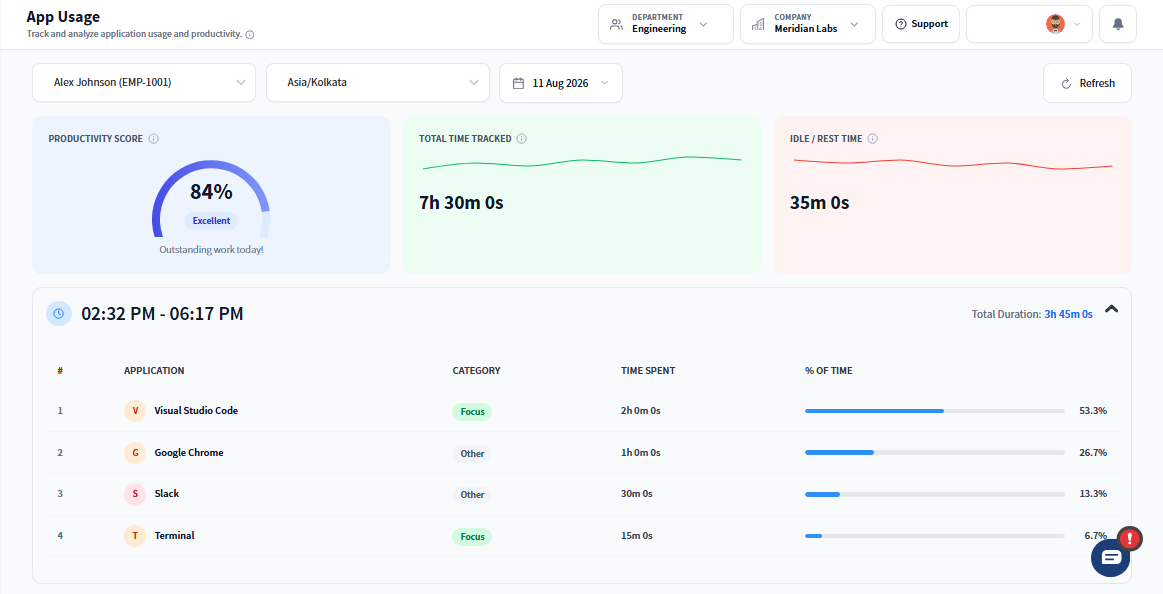
Why Idle Time Deserves a Closer Look
- Detects idle periods through real-time activity monitoring
- Helps distinguish between disengagement and legitimate breaks
- Sends smart, customizable nudges when productivity dips
- Offers role-based insights into recovery and focus trends
- Keeps idle tracking transparent, ethical, and aligned with performance goals
- Designed for time tracking for in-office and remote teams
- For Managers: Gain clarity into when productivity dips, how long recovery takes, and where coaching makes the most impact.
- For Employees: Stay informed and in control — reclassify idle time and receive gentle nudges to regain focus, without micromanagement.
What Idle Time Detection Software Should Include
Real-Time Idle Detection
Track inactivity the smart way.
- Monitors keyboard/mouse behavior to flag idle time
- Auto-timestamps each idle session
- Works only during active, visible sessions
Break Classification & Tagging
Give idle time the right context.
- Employees can tag sessions
- Admins define accepted classifications
- Enables fair and meaningful reporting
Productivity Nudges
Stay focused with gentle guidance.
- Sends alerts during inactivity
- On-screen cues prompt return to tasks
- Supports engagement without pressure
Idle Heatmaps & Insights
Turn downtime into data.
- View idle patterns by user, team, or time
- Identify bottlenecks and high-idle periods opportunities
- Customize reports by role, shift, or location
Recovery & Engagement Metrics
See what happens after idle time.
- Track team output post-idle
- Analyze how quickly productivity resumes
- Align coaching with data-driven signals
How Background Activity Is Measured
Smart Session Initiation
Tracking begins when users clock into their session. All idle logs are tied to active, visible sessions — never stealth monitoring.
Inactivity Is Monitored in Context
Idle time is captured based on keyboard/mouse inactivity. Users can reclassify time or confirm break reasons.
Nudges Trigger and Insights Sync
Based on idle thresholds, smart nudges activate. Reports flow to centralized dashboards for analysis, coaching, and export.
Idle Time vs Active Time Explained
| Feature | Prodaff | Typical Tools |
|---|---|---|
| Idle vs. Break Classification | Context-Aware | Often Bundled |
| Idle Heatmaps | Visual & Granular | Rare |
| Nudges & Alerts | Configurable | Inconsistent |
| Role-Based Access | Permissioned | Broad Access |
| Recovery Tracking | Built-In Insights | Usually Missing |
Frequently Asked Questions
It measures a lack of keyboard and mouse activity over a set threshold, then flags that period as idle rather than active work time, so reports reflect real engagement, not just clock time.
No. Idle time detection software surfaces the data; how it's used is up to the manager. Prodaff shows idle vs. active time as context for planning and fairness, not as an automatic penalty.
Yes. Idle thresholds and rules can be tuned so roles with long reading, planning, or phone-based work aren't unfairly flagged as inactive just because there's no keyboard movement.
Yes — activity on video calls and other applications still registers as active use, so time on calls isn't misclassified as idle just because there's less typing.
Seeing idle vs. active time patterns helps managers spot workload imbalances, plan realistic project timelines, and identify when breaks are needed, turning idle time detection software into a planning tool, not just a monitoring one.
Ready to get started?
Try Prodaff for free and see how easy it is to track time, boost productivity and manage teams with confidence.