

Desktop Time Tracker for Windows and Mac Teams
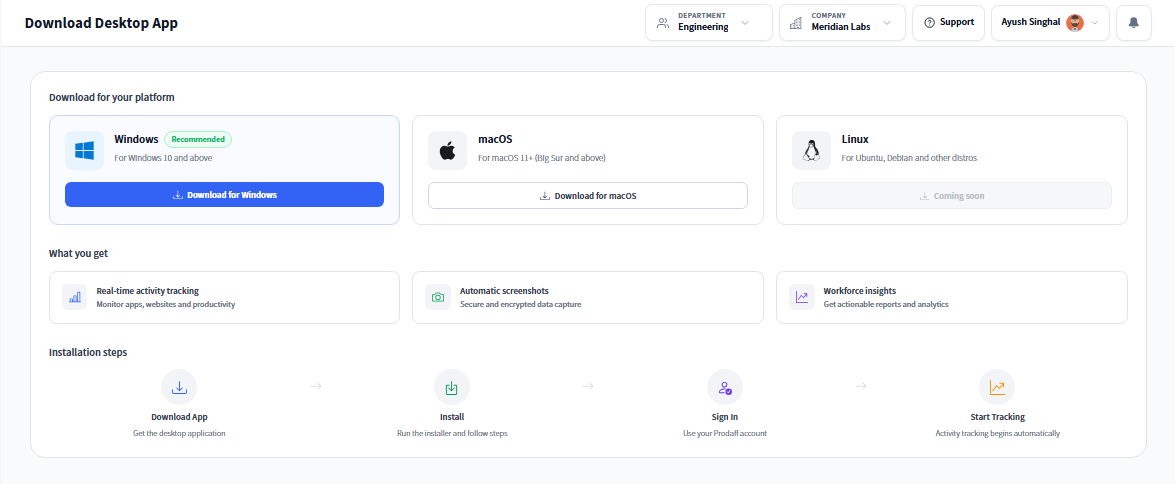
Prodaff runs natively on Windows and Mac to monitor work sessions quietly in the background—no browser, no manual input.
Why Teams Choose Prodaff's Desktop App
- Desktop-based employee monitoring app optimized for PC and Mac
- Tracks working sessions automatically — including idle time and optional screenshots
- Works as an offline time tracking solution — no internet needed for logging
- Automatically logs time spent on specific tasks
- Secure background activity tracker for PC teams, designed for privacy and compliance
- Eliminates browser dependency for accurate , consistent monitoring
- For Managers: Track time by team or task without chasing updates — and keep logs audit-ready.
- For Employees: Stay focused — tracking is private, silent, and never interrupts your workflow.
Core Features of a Reliable Desktop Time Tracker
Non-Intrusive Time Logging
Runs quietly without disrupting work.
- Auto-starts on login or with one click
- Captures session time silently
- No browser dependency or popups
Task Overlay & Idle Reminders
Keep focus intact — gently.
- Tracks tasks silently without user disruption
- Detects idle time to flag focus breaks automatically
- Preserves productivity without visible prompts
Idle Time & Productivity Tracking
Understand engagement without guesswork.
- Detects when sessions go idle
- Helps refine payroll and performance reports
- Supports productivity analysis
Optional Screenshot Capture
Visual validation when required.
- Configurable based on role or policy
- Ensures compliance in regulated setups
- Encrypted, timestamped, and fully optional
Role-Based Access & Data Security
Privacy-first by design.
- Granular controls for data visibility
- Encrypted at every stage
- Aligned with enterprise-level compliance standards
How the Desktop App Works Behind the Scenes
Quick Install on Windows or Mac
Users install the app once — it runs in the background and auto-launches if desired.
Tracks Sessions Automatically or Manually
Whether auto-started or manually triggered, time tracking begins with no extra effort.
Live Sync to Manager Dashboard
All tracked data, including idle flags and task sessions, updates instantly for managers.
Where Desktop Time Tracking Fits Your Workflow
- 01
Agencies
Bill clients accurately with proof-of-work
- 02
Remote & Offshore Teams
Ensure consistent tracking, no matter the location
- 03
CX Teams
Connect work sessions to ticket resolution and agent output
- 04
Finance & Ops
Enable clean audit trails and track time for compliance
What Makes the Best Desktop Time Tracker?
| Feature | Prodaff Desktop App | Browser Plugins |
|---|---|---|
| Silent background logging | Yes | Often manual |
| Task overlay & idle reminders | Built-in | Rare or unavailable |
| Idle time detection | Real-time | Limited |
| Optional screenshots | Flexible & secure | Often forced |
| Role-based access | Yes | Basic or none |
| End-to-end encryption | Yes | Frequently unsecured |
Frequently Asked Questions
Prodaff's desktop time tracker runs natively on both Windows and Mac, so mixed-OS teams can standardize on one tool instead of juggling platform-specific trackers.
Yes — the desktop time tracker free trial lets you install the app, log time for a few days, and review reports before deciding to purchase, no commitment required upfront.
No. It's a true desktop app, not a browser extension, so tracking continues even if no browser is open — that's part of what makes it more reliable than browser-based timers.
The best desktop time tracker balances simplicity with depth. Prodaff offers one-click tracking, task tagging, and idle detection out of the box, so it scales from a five-person team to a large distributed workforce without changing tools.
Yes. Time continues logging locally if the internet connection drops, then syncs automatically once the device reconnects, so no work hours are lost during outages.
Ready to get started?
Try Prodaff for free and see how easy it is to track time, boost productivity and manage teams with confidence.