

Employee Task Management Software for Project Teams
Structure projects, assign tasks, and track work execution — all without micromanaging. Prodaff turns plans into performance.
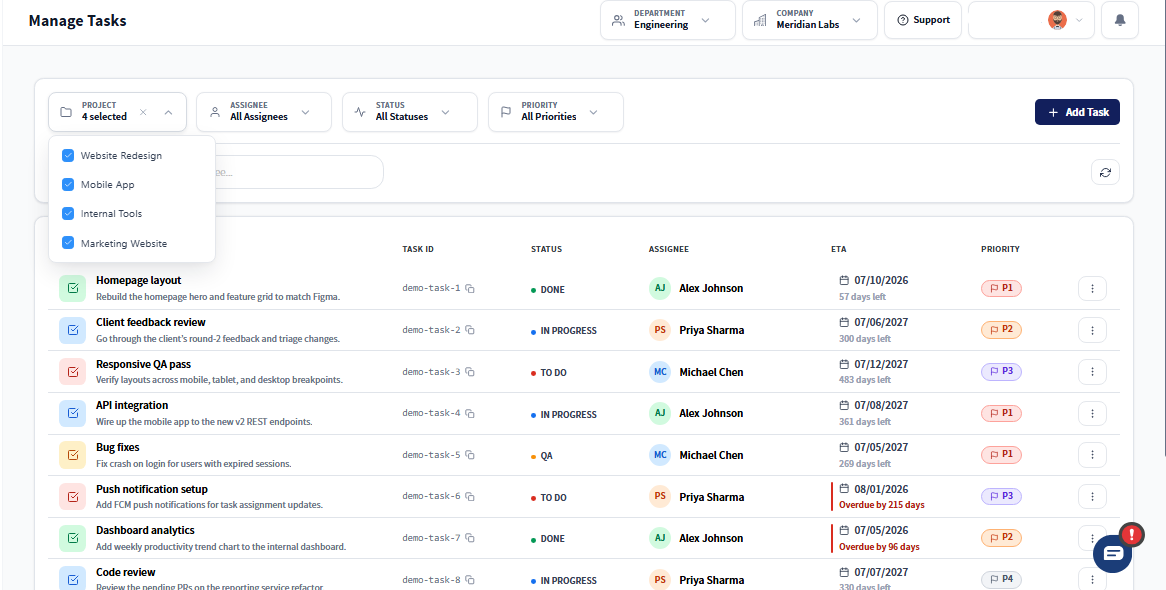
Why Project and Task Management Works Better
- Create teams and assign project roles for seamless oversight
- Manage projects with grouped tasks, due dates, and priorities
- Track progress and time at task-level through a real-time dashboard
- Auto-sync time logs from the Prodaff desktop app
- Export role-based reports for clients, reviews, or compliance
- For Project Managers & Team Leads: Get full visibility into task progress, team capacity , and delivery timelines.
- For Operations & Support Leaders: Coordinate daily execution across departments without added overhead.
What Employee Task Management Software Should Include
Task Dashboard
Track what's happening and resolve roadblocks fast.
- Filter tasks by user, team, or progress
- Run live reviews using visual boards
- Identify bottlenecks and act early
Project Management
Plan and deliver structured outcomes.
- Group tasks by milestone, team, or client
- Assign due dates and custom labels
- Oversee all projects from one view
Team Setup & Role-Based Access
Define teams and protect data access.
- Assign users to Admin, Manager, or Employee roles
- Control visibility and task permissions
- Support secure, structured collaboration
Task Assignment & Progress Tracking
Drive execution without manual inputs.
- Assign tasks with clear statuses
- Log work automatically via desktop tracking
- Maintain live accountability by task
Completion Reports
Showcase work with export-ready insights.
- View time spent by task, user, or team
- Export reports in PDF, Excel, or CSV
- Use for audits, payroll, or performance reviews
How Daily Worksheets Keep Tasks on Track
Assign Tasks with Precision
Add due dates, labels, and owners for each task. Ensure ownership and streamline expectations.
Group by Project or Goal
Structure tasks around deliverables, clients, or KPIs. Track project health at a glance.
Link Time Automatically
As users work, Prodaff auto-logs time to assigned tasks—no manual entry required.
Where Task Management Fits Your Team
- 01
Remote Teams
Keep everyone aligned with live dashboards
- 02
Support & Ops
Monitor task flow and meet SLAs
- 03
Agencies
Bill clients by task with real-time records
- 04
Tech & Dev Teams
Log time by sprint, bug, or feature
- 05
HR & Admin
Track recurring internal workflows accurately
How Prodaff Compares to Manual Task Boards
| Feature | Prodaff | Typical Tools |
|---|---|---|
| Time-linked task tracking | Yes | Manual effort |
| Team and role configuration | Built-in | Basic only |
| Project + task dashboards | Unified | Fragmented |
| Export-ready reports | Supported | Limited |
| Optimized for desktop | Yes | Often mobile-centric |
Frequently Asked Questions
Yes. Prodaff works as employee project and task management software, so you can organize work at the project level and still track individual tasks underneath it, without switching tools.
Employee daily worksheet and task management software features let team members log what they worked on each day, giving managers a running record that ties directly to time and task data, not a separate spreadsheet to maintain.
Yes — the employee task management software free trial gives full access to project and task setup, so you can map out real work before deciding whether to subscribe.
Yes. Reports show task status, time spent, and worksheet history side by side, which typically gives more detail than a manual task board, since time and progress are captured automatically instead of updated by hand.
Yes. Tasks and projects carry visibility into time spent versus what's outstanding, so managers can spot at-risk deadlines before they're missed rather than after.
Ready to get started?
Try Prodaff for free and see how easy it is to track time, boost productivity and manage teams with confidence.