

Customer Support Team Software for Time and Performance
Prodaff helps call centers boost responsiveness, cut delays, and meet SLAs — without intrusive tracking or extra admin.
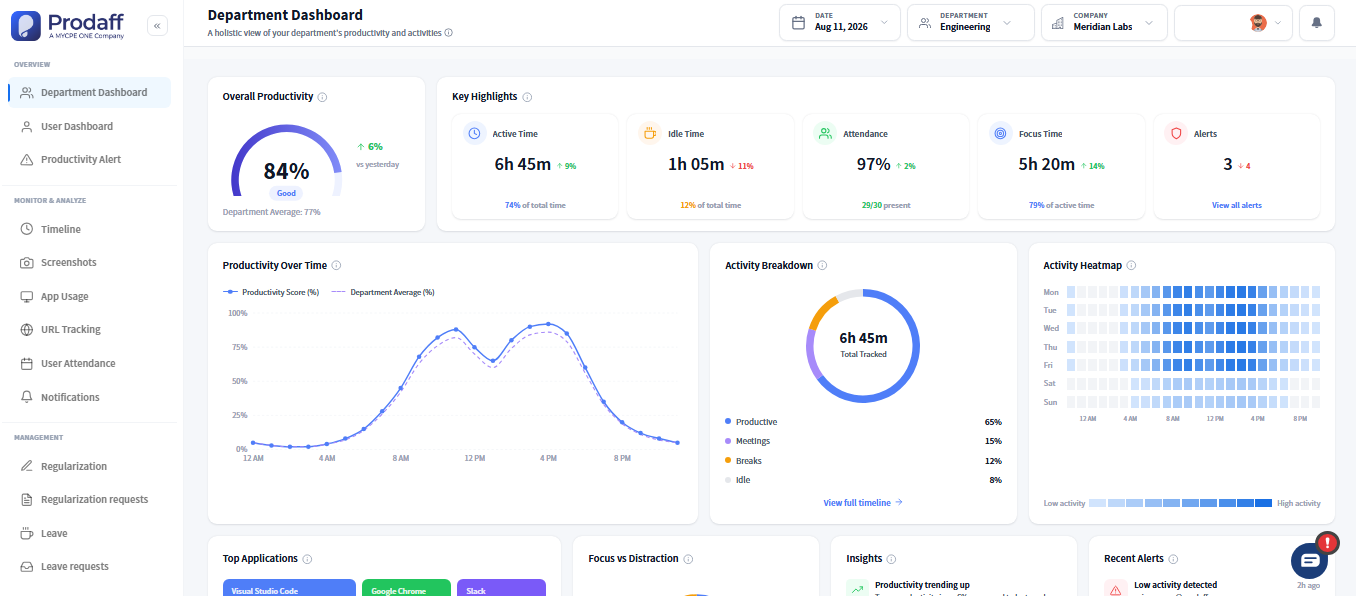
Built to Keep Support Teams Focused on SLAs
- Track time across support channels: calls, chat, email
- Monitor shifts globally with timezone-aware dashboards
- Reduce absenteeism and idle time with live alerts
- Reinforce SLA adherence with timestamped logs
- Align daily output with staffing plans and client goals
For CX Leaders & Support Managers
Get visibility into queue-level performance and reduce oversight with real-time dashboards.
For Call Center Agents & Remote Teams
Stay aligned with shift plans and deliver support confidently — with full transparency and no micromanagement.

Core Features of Customer Support Team Software
Shift-Based Time Tracking
Map time by queue, shift, or campaign.
- Auto-tag hours by channel or project
- Ideal for 24/7 and rotating schedules
- Supports queue- and team-specific reporting
Activity-Based Focus Metrics
Track time spent on productive support.
- Detect idle time and wrap-up delays
- Measure time by agent, team, or channel
- Spot trends in responsiveness
Real-Time Dashboards
Live data for proactive support operations.
- View shift adherence across agents
- Compare team outputs by region or client
- Get alerts for missed breaks or lulls
Compliance-Ready Logs
Secure, immutable audit trails for every session.
- Timestamped activity by shift or task
- Tamper-proof for HR and SLA compliance
- Ready for audits, client reviews, or QBRs
Branded Report Export & Sharing
hare reports with internal or external stakeholders.
- Schedule reports by day, shift, or campaign
- Export as Excel, PDF, or secure web links
- Filter by team, client, or channel
How Time Tracking Connects to Support Ticket Volume
Admins define shifts and queue tags
Managers configure shifts by region or SLA, and assign tags for clients, queues, or channels.
Agents track time seamlessly
Agents stay focused as Prodaff logs time in the background. Idle alerts and overlays keep shifts aligned.
Dashboards and reports sync in real time
Supervisors and QA leads view live adherence, productivity trends, and generate exportable insights instantly.
Where Support and CX Teams Use Prodaff
- 01
CX Centers
Monitor global queues and reduce missed SLA thresholds
- 02
BPOs
Automate client-facing time logs and campaign summaries
- 03
Internal Help Desks
Improve responsiveness and reduce backlogs
- 04
QA Teams
Tie support data to CSAT and agent reviews
- 05
Hybrid/Remote Support
Track across office and remote shifts equally
What Service Metrics Matter Most for Support Teams
| Feature | Prodaff | Typical Tools |
|---|---|---|
| Shift & queue-based tracking | Yes | Limited |
| Real-time dashboards | Live Data | Delayed or Absent |
| Role-based visibility | Granular | Flat or Missing |
| Idle & after-call detection | Built-In | Basic or Absent |
| Exportable compliance logs | Audit-Ready | Manual & Time-Consuming |
| Privacy-respecting tracking | No Screenshots | Often Intrusive |
Frequently Asked Questions
Yes — tag time by campaign, channel, or client with full filtering options.
Yes — connect via API or export logs to platforms like Zendesk, Freshdesk, and more.
Absolutely — Prodaff is location-agnostic and ideal for distributed support models.
Real-time trends flag early warning signs so managers can intervene quickly.
Yes — create branded exports or secure view-only links on your schedule.
Ready to get started?
Try Prodaff for free and see how easy it is to track time, boost productivity and manage teams with confidence.