

Software Development Team Management and Time Tracking
Prodaff empowers engineering teams to monitor productivity, uncover blockers, and deliver on time — without disrupting developer focus or privacy.
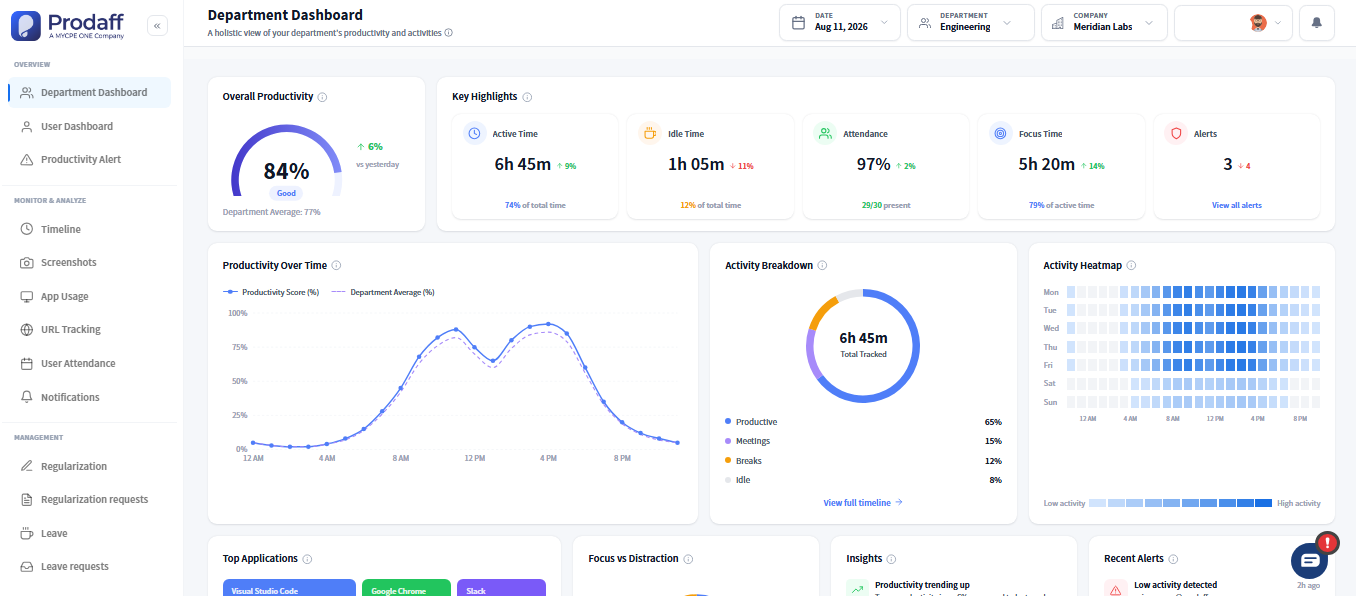
Built to Respect Developer Focus and Flow
- Track time across tickets, sprints, epics, and repositories
- Maintain developer flow with silent, background tracking
- Identify context-switching, blockers, and burnout risks
- Map logged hours to delivery and velocity metrics
- Share sprint reports with product, QA, and leadership
For Engineering Leaders
Get clarity into time spent, spot blockers, and drive sprint performance.
For Developers
Stay focused while your time is captured passively — no micromanaging or interruptions.

Core Features for Software Development Team Management
Background Time Logging
Silent, desktop-based tracking for dev tools and repos.
- No manual input or browser switching
- Captures by app, tool, or repo
- Fully passive and secure
Ticket-Level Time Mapping
Tag time to JIRA, GitHub, or sprint stories.
- Link entries by epic, PR, or ticket
- Sync with task IDs or comments
- Improve sprint forecasting
Focus & Burnout Signals
Spot patterns that reveal fatigue
- Detect idle gaps and frequent switches
- Auto-flag context switching risks
- Balance workload across engineers
Sprint-Based Reporting
Track velocity with dev-ready sprint analytics.
- Log time by story, project, or team
- Include blockers and notes
- Export sprint reports for retrospectives
Privacy-First Tracking
Built for developers — not surveillance.
- No screen recording or keylogging
- Transparent and role-based visibility
- Trusted by remote teams
How Agile Tools Fit Into Sprint Tracking
Silent Background Logging
Developers track time automatically while coding — with no manual entry or distraction from tools.
Idle Time & Burnout Detection
Prodaff detects inactivity, spikes in task switching, or sudden drop-offs that may indicate bottlenecks.
Sprint Reporting & Sharing
Managers filter and export logs by engineer, repo, or story to share with stakeholders or review retrospectives.
Where Development Teams Use Prodaff
- 01
Sprint Planning
Use historical time logs to scope accurately
- 02
Code Review & QA
Track time spent on PRs, testing, and triaging
- 03
DevOps & Maintenance
Measure time spent on builds, infra, and CI/CD
- 04
Remote Development Teams
Gain visibility into distributed team workloads
- 05
Stakeholder Communication
Share insights with product, QA, or clients
What Effective Sprint Tracking Looks Like for Dev Teams
| Feature | Prodaff | Others |
|---|---|---|
| IDE-Based Background Logging | Seamless | Often Missing |
| Ticket-Level Mapping | Built-In | Manual Setup |
| Burnout & Focus Signals | Auto-Flagged | Not Available |
| Sprint Reporting | Sprint-Aware | Generic Only |
| Privacy-First Monitoring | No Screenshots | Intrusive Tools |
Why Prodaff Works Better for Dev Teams
Yes — time logs can be linked to commits, PRs, or stories.
No. Prodaff runs silently in the background with no IDE interruption.
Never. Prodaff prioritizes privacy with ethical, role-based tracking only.
Yes — by repo, engineer, sprint, or story, with optional annotations.
Ready to get started?
Try Prodaff for free and see how easy it is to track time, boost productivity and manage teams with confidence.