

Employee Productivity Reports for Smarter Decisions
Prodaff’s detailed reports help you analyze time, performance, and productivity — giving you the clarity to improve focus, planning, and team outcomes.
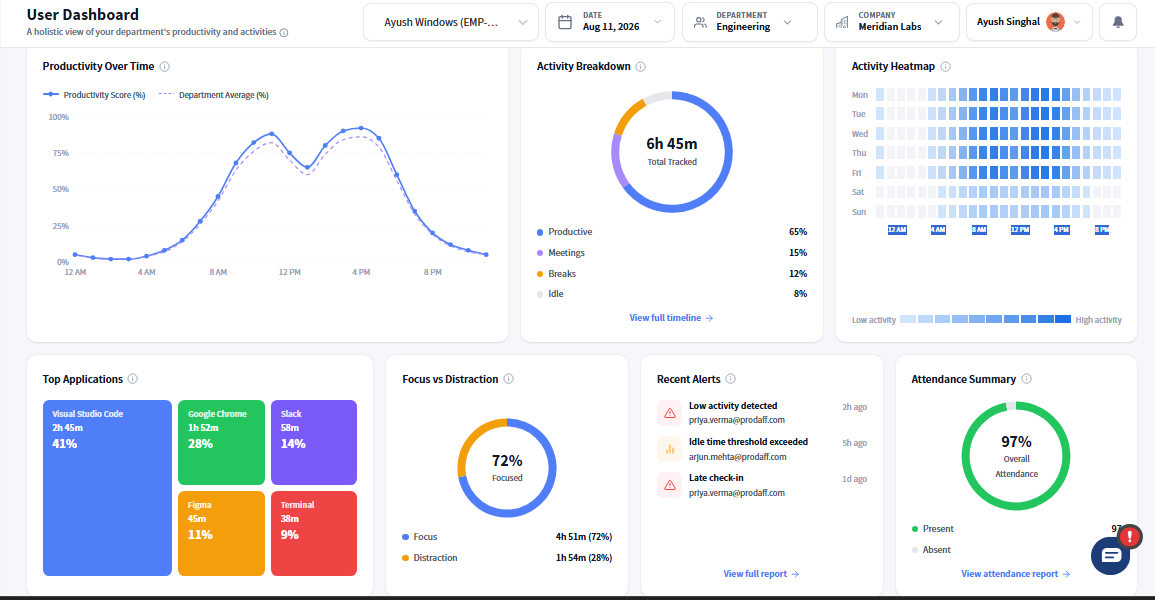
Real-Time Data, Ready-Made Reports
- View time usage by team, project, or individual
- Monitor attendance, absenteeism, and idle trends
- Generate audit-ready logs for payroll or compliance
- Filter and export by task, date range, or user
- Get real-time visibility without complex BI tools
- For Ops Heads & Managers: Uncover team insights and improve execution — without micromanaging .
- For CXOs & Decision Makers: Make confident, data-informed decisions using real-time workforce analytics.
Core Features of Employee Productivity Reports
Team Analytics Reports
Visualize how your departments perform over time.
- Track total hours and trends by role or team
- Spot over- or under-utilized units
- Measure time allocation across live projects
Individual Performance Insights
Drill into day-to-day work by employee.
- Review task-level time usage
- Compare hours logged vs. output
- Identify coaching or capacity needs
Exportable Logs
Turn tracked data into professional reports.
- Export to Excel, PDF, or CSV
- Share clean summaries with clients or HR
- Retain all filters and formats
Attendance & Absence Reports
Stay ahead of scheduling and compliance issues.
- View timestamps for presence and leave
- Track missed logins or overbooked shifts
- Audit daily availability by role or site
Productivity Dashboards
Map time into actionable performance insights.
- Benchmark team focus vs. idle time
- Visualize top performers and gaps
- Compare over time or by project
How Raw Time Logs Become Actionable Reports
Track Automatically
Time and activity are logged in real-time through the Prodaff desktop app — with no manual input needed.
Tag & Categorize
All tracked time is linked to projects, tasks, and user roles — organizing effort at every level.
Filter, Export, Act
Managers slice the data by user, team, or period, then export insights for billing, payroll, or performance reviews.
Where Productivity Reports Matter Most
- 01
Managers
See how time is spent and where support is needed
- 02
HR & Compliance
Generate audit-compliant logs and leave records
- 03
Project Teams
Assess output versus estimated hours
- 04
Leadership
Visualize team health and real-time performance
What Makes Prodaff Reports More Actionable?
| Feature | Prodaff | Others |
|---|---|---|
| Built-in Export Options | One-click | Often limited |
| Unified Attendance + Task Logs | Combined View | Siloed data |
| Role-Based Dashboards | Granular | Inconsistent |
| Employee Self-View Access | Transparent | Rarely included |
| Real-Time Data Sync | Always-on | Delayed/manual |
Frequently Asked Questions
Reports include active vs. idle time, task and project breakdowns, and attendance data, giving a complete picture of a work period rather than a single output number.
Yes. Reports can be scheduled to generate and deliver on a recurring basis, so managers get regular updates without manually pulling data each time.
Yes. Employee productivity reports can be filtered by user, team, date range, or project, so you can drill into a specific person's data or view a team rollup as needed.
Yes. Reports export to PDF, Excel, or CSV, making them easy to share in leadership reviews or attach to performance conversations without reformatting.
Yes. Historical data lets you compare productivity trends week over week or month over month, so employee productivity reports show patterns, not just isolated data points.
Ready to get started?
Try Prodaff for free and see how easy it is to track time, boost productivity and manage teams with confidence.