

Automatic Time Capture Software That Runs in the Background
Prodaff’s non-disruptive time capture solution delivers automated time logging — no timers, no toggles, just real visibility into real work.
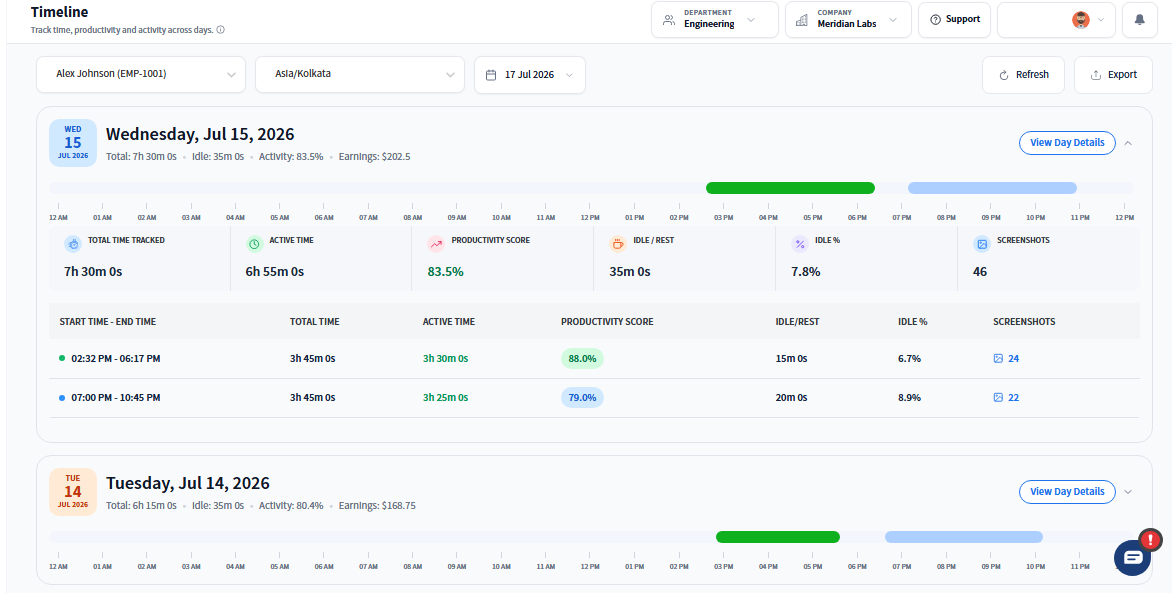
Why Automatic Time Capture Works So Well
- Automates time logging for desktop work—no manual input needed
- Captures active work, idle time, and task focus in real time
- Ideal for remote, hybrid, and compliance-focused teams
- Eliminates time leakage while maintaining full employee transparency
- For Managers: Get real-time visibility into how teams use their time — without disrupting workflows or relying on self-reported logs.
- For Employees: Stay focused — Prodaff runs quietly in the background and respects your session privacy. You’re always in control.
What to Expect From Time Capture Software
Passive, Background Operation
Non-intrusive and always on.
- Tracks sessions without clicks or timers
- Auto-starts with login
- Tamper-proof desktop integration
Real-Time, Encrypted Syncing
Live updates. Secure by design.
- Real-time sync to dashboards
- Fully encrypted at rest and in transit
- Captures task, idle time, and screenshots
Privacy-First Tracking
Oversight that builds trust.
- Employees can pause sessions anytime
- No stealth tracking or forced screenshots
- Role-based visibility and access control
Optional Visual Indicators
Transparency where it matters.
- Custom visual cues for active tracking
- Configurable by team or policy
- Keeps teams informed, not monitored
Data Accuracy for Payroll & Billing
Replace spreadsheets with precise, verifiable logs.
- Export by task, project, or client
- Supports audits, invoices, and compliance reviews
- Compatible with external payroll systems
How Background Time Logging Works
Install once — runs silently.
Users install the desktop app once. It starts automatically with each session — no toggles or timers needed.
Tracks sessions in real-time.
Every work session, break, or idle period is logged automatically, supporting productivity without disruption.
Syncs instantly to the dashboard.
Managers receive real-time visibility via encrypted sync — ideal for audits, project reviews, or operational insights.
Where Time Capture Fits Your Team's Workflow
- 01
Agencies
Automate billable hours without needing timesheets
- 02
Remote Teams
Ensure accurate logs across time zones and shifts
- 03
Consulting Firms
Track work across calls, research, and deliverables
- 04
Support Teams
Measure ticket time and monitor SLA compliance
- 05
Compliance-Driven Ops
Create tamper-proof, audit-ready logs
Is There Free Time Tracking Software With Screen Capture?
| Feature | Prodaff Automatic Capture | Traditional Time Trackers |
|---|---|---|
| Passive, always-on tracking | Yes | Manual input required |
| Immune to manual shutdown | Yes | Easily tampered |
| Background operation | Silent & stable | Often disruptive |
| Role-based access control | Granular | One-size-fits-all |
| Privacy-first design | Trust built-in | Minimal transparency |
| Enterprise-grade encryption | End-to-end | Often basic |
Frequently Asked Questions
Prodaff's time capture software detects work sessions automatically from desktop activity, so hours get logged without anyone remembering to hit start. It removes the most common source of missing or inflated time entries: forgetting to click the timer.
Yes. You can try free time tracking software with screen capture through Prodaff's trial, which pairs automatic time logging with optional screenshots so you can evaluate both features together before subscribing.
No. Prodaff is time capture software for work hours and screenshots, not real time motion capture software or real time video capture software used for animation, fitness, or video production — it captures periodic desktop images, not continuous video or movement data.
No. Time capture runs as a lightweight background process, so it logs activity and takes screenshots without a noticeable impact on system performance or employee workflow.
Yes. Employees can view their own logged hours and captured screenshots, keeping the process transparent rather than something happening invisibly behind their back.
Ready to get started?
Try Prodaff for free and see how easy it is to track time, boost productivity and manage teams with confidence.