

Employee Scheduling Software for Shifts and Time Off
Coordinate availability, assign shifts, and manage leave — all in one desktop-optimized platform that keeps your teams aligned, compliant, and covered.
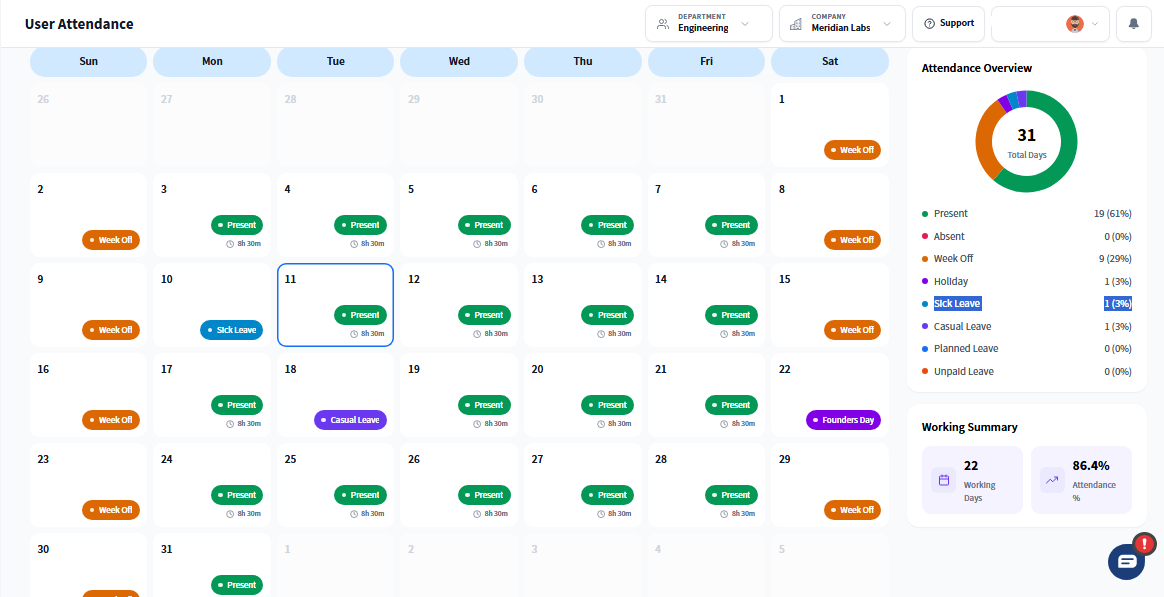
Why Prodaff Makes Scheduling Effortless
- Ensure shift coverage without calendar conflicts or manual scheduling errors
- Empower employees to manage their own availability and request time off
- Monitor compliance with rest hours, leave balances, and policy rules
- Detect coverage gaps and scheduling risks before they cause disruption
- Gain real-time visibility into who’s working, unavailable, or overbooked
- For HR & Workforce Managers: Manage shifts, requests, and compliance without relying on external spreadsheets or third-party schedulers.
- For Operations & Team Leads: Prevent staffing gaps, optimize shift coverage, and ensure every schedule matches your workload needs.
What Employee Scheduling Software Should Include
Shift Scheduling
Assign, repeat, and manage shifts — no disruption, full visibility.
- One-time or recurring shift assignments
- Color-coded by department or role
- Approve swaps and track updates easily
Time Off Tracking
Track and audit leave with full transparency.
- PTO, vacation, sick leave, and custom categories
- Accrual rules and carry-forward policies
- Real-time alerts for conflicts and staffing risks
Availability Management
Schedule with input from your team.
- Let employees set availability preferences
- Receive notifications for coverage gaps
- Auto-suggest users for open shifts
Centralized Calendar
Bring all schedules into one live interface.
- View by team, user, or region
- Overlay shifts and time-off requests
- Sync with Prodaff time tracking
How Employee Work Schedules Stay Accurate
Set Rules & Availability
Build leave policies and define availability per user or team. Configure time-off types and accrual logic Let users submit shift preferences Avoid conflicts from the start
Assign & Track in Real Time
Manage time-off and shift assignments dynamically. Drag-and-drop scheduling with color-coded calendars Review and approve changes instantly Track hours and attendance automatically
Monitor Workforce Readiness
See who’s staffed, overbooked, or offline — instantly. Review team capacity in real time Detect policy violations before they escalate Export staffing data for audits or planning
What Should Leave Management Include?
- 01
Call Centers & CX Teams
Maintain full 24/7 shift coverage
- 02
Finance & Admin
Eliminate gaps during month-end close
- 03
Tech & IT Support
Plan late-night or weekend support shifts
- 04
Remote & Hybrid Teams
Align global team schedules seamlessly
Where Scheduling Software Fits Your Team
| Feature | Prodaff | Other Tools |
|---|---|---|
| Desktop-First Shift Management | Optimized | Mobile-focused |
| Integrated Time Tracking | Native sync | Often separate |
| Auto-Conflict Detection | Built-in alerts | Manual checks |
| Unified Schedule & Leave View | One calendar | Fragmented |
| Custom Leave Policies | Fully configurable | Limited options |
Frequently Asked Questions
Yes. Employee scheduling software from Prodaff combines shift planning with time off management, so approved leave automatically reflects in the schedule instead of needing manual cross-checking.
Employees submit requests, managers approve or decline them in the app, and the result updates the employee work schedule software view automatically, no separate spreadsheet or email chain required.
Yes. Leave management supports distinct categories like vacation, sick, and personal time, so balances and reporting stay accurate for each type rather than one combined bucket.
Yes. Employees can view their upcoming shifts and remaining leave balance directly, reducing back-and-forth questions to managers or HR.
Yes. Once a time off request is approved, employee work schedule software updates that shift automatically, keeping the published schedule accurate without manual edits.
Ready to get started?
Try Prodaff for free and see how easy it is to track time, boost productivity and manage teams with confidence.