

Office Productivity Management for In-Office Teams
Prodaff empowers in-office teams to stay focused, aligned, and accountable — with live dashboards, secure logs, and shift-linked tracking designed for productivity, not control.
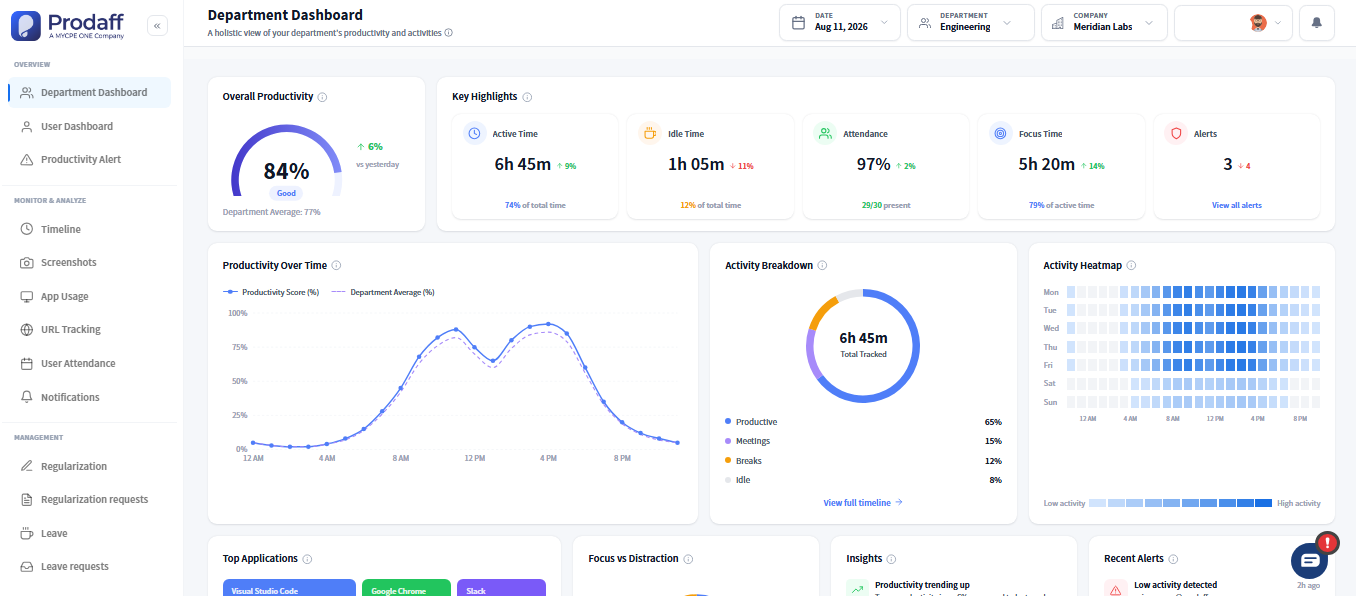
Built for Teams That Work On-Site
- Log start, break, and end times automatically
- Monitor shift adherence and early exits in real time
- Reduce manual punch errors and paper tracking
- Reinforce compliance with audit-ready logs
- Give team leads floor-wide visibility without micromanagement
For Ops Managers, HR Admins & Supervisors
Run your operations floor with confidence, oversight, and precision — all without added admin effort.
For In-Office Employees
Track time seamlessly with transparent, tamper-proof logs that respect privacy and improve fairness.

Core Features of Office Productivity Management
Shift & Punch-In Tracking
Ensure teams start and end shifts on time.
- Auto-track logins, logouts, and break durations
- Syncs with assigned schedules and shift plans
- Flags late starts, early outs, and overtime
Live Activity Dashboards
See floor activity in real time.
- View department-wide active vs idle users
- Monitor floor occupancy or desk-level coverage
- Drill down by zone, role, or project
Break & Overtime Monitoring
Stay compliant and balanced.
- Track all scheduled and unscheduled breaks
- Flag excessive overtime or missed rest periods
- Support fair workload distribution
Role-Based Access Control
Ensure the right people see the right data.
- Team leads view only their group’s logs
- HR gains global time access for compliance
- Employees see only their own sessions
Instant Reports & Export Tools
Make insights shareable and actionable.
- Filter reports by team, date, or attendance metric
- Export to Excel, PDF, or share via secure links
- Schedule recurring weekly/monthly reporting
How In-Office Solutions Track Time and Breaks
Employees Log In Automatically
The Prodaff desktop app tracks start/end times and breaks without manual input or punch cards.
Dashboards Monitor Live Activity
Supervisors see real-time presence, idle status, and shift alignment across floors or departments.
Reports Are Exported or Shared
Attendance, shift compliance, and OT reports are shared with payroll, HR, or compliance as needed.
Where On-Site and Floor Teams Use Prodaff
- 01
Manufacturing & Production
Prevent early exits and ensure shift effort is met
- 02
Call Centers
Monitor login schedules and floor availability
- 03
Administrative Offices
Replace paper logs with tamper-proof tracking
- 04
Finance & Insurance
Ensure labor law compliance and audit-readiness
- 05
HR & Compliance Teams
Automate historical log access for review
What Workplace Efficiency Looks Like With Prodaff
| Feature | Prodaff | Other Tools |
|---|---|---|
| Auto shift & punch tracking | Yes | Manual Entry |
| Real-time floor dashboards | Live | Static or Delayed |
| Break & overtime logs | Accurate | Often Skipped |
| Role-based data access | Secure | Flat Access |
| Employee visibility | Transparent | Opaque |
| Exportable audit-ready logs | Branded | CSV Only |
Frequently Asked Questions
No — it works across in-office, hybrid, and remote setups seamlessly.
Via the desktop app. Everything is synced automatically to employee profiles.
Yes. Logs are encrypted, immutable, and aligned with compliance best practices.
Absolutely — late logins, long breaks, and overtime are monitored live.
Yes. Prodaff follows transparent, ethical practices with visible tracking indicators.
Ready to get started?
Try Prodaff for free and see how easy it is to track time, boost productivity and manage teams with confidence.