

Online Employee Time Tracking Software That Runs Silently
Simple, non-intrusive employee time clock software that runs silently on employee systems — giving you accurate, transparent work logs without compromising privacy.
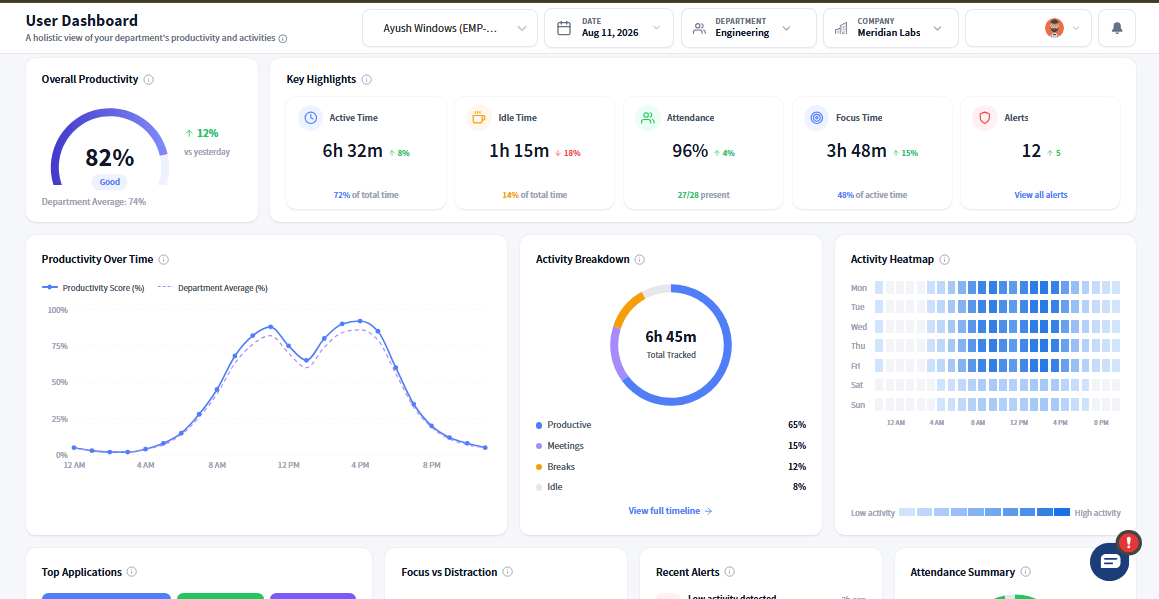
Why Teams Trust Prodaff for Time Tracking
- Desktop-first time clock app software — no browser dependency
- One-click start/stop time tracking
- Task overlay reminds employees when tracking is active
- Automatically logs time spent on specific tasks
- Idle time detection to measure actual productivity
- Transparent logs that benefit both teams and clients
- Designed for time tracking for in-office and remote teams
- For Managers: Get clarity into time spent, spot bottlenecks, and improve billing accuracy.
- For Employees: No guesswork. No forced surveillance. Just a smarter, fairer way to track hours.
What to Look for in a Time Tracker and Timesheet Software
Simple & Non-Intrusive Time Logging
Let employees log hours without feeling monitored.
- One-click clock-in/out
- Runs silently in the background
- No browser, no popups, no friction
Task-Linked Time Capture
Connect time to actual work.
- Tag time by task or project
- Visual overlay shows task tracking is live
- Ideal for client billing or performance reporting
Idle Time & Productivity Insights
See when focus drops—and why.
- Detects idle vs. productive periods
- Improves workload planning
- Enables better planning
Optional Screenshot Capture
Visual proof without disruption.
- Captures during active sessions
- Supports audits and compliance
- Stealth Mode
Easy-to-Read, Exportable Reports
Data that’s ready for decision-making.
- Export reports in PDF, Excel, or CSV
- Filter by user, date range, task, or project
- Share with clients, HR, or leadership
How Online Time Tracking Works
Install the Prodaff desktop app
Choose the version for Windows or Mac. Once installed, Prodaff launches automatically or with one click. Lightweight and simple — no browser extensions required.
Start tracking time and productivity
As employees clock in, Prodaff begins silent background tracking. Time is logged by task, idle time is captured, and screenshots (if enabled) offer added transparency.
Generate reports and monitor visibility
Access clear, export-ready reports filtered by task, project, or employee. Gain insight into performance, planning, and compliance — without micromanaging.
Where Teams Use Employee Time Tracking Software
- 01
Agencies & Consulting Firms
Log time for client tasks — and justify every billable hour.
- 02
Remote Teams & BPOs
Standardize productivity measurement across global desktops.
- 03
Customer Support & Operations
Track task time, ticket handling, and SLA performance.
- 04
Finance & Audit Teams
Access defensible logs for reporting, billing, or compliance.
What Makes the Best Time Tracker for Teams?
| Feature | Prodaff | Traditional Tools |
|---|---|---|
| Desktop time clock software | Yes | Browser-based |
| Silent background operation | Yes | Often manual |
| Employee-controlled tracking | Yes | System-initiated |
| Idle time detection | Yes | Basic timers only |
| Task overlay visibility | Yes | Lacking |
| Screenshot support (optional) | Yes | Forced or absent |
Frequently Asked Questions
Yes. Prodaff's employee time tracking software gives employees one-click control to start and stop tracking themselves — there's no silent, forced timer running in the background. A visible task overlay confirms exactly when tracking is active, so employees always know their status. This employee-first design is a big reason teams call it the best employee time tracking software for building trust instead of surveillance.
No. Unlike many time tracking software tools that log every app opened or website visited, Prodaff focuses only on task-linked time and idle detection — not app inventories or browser history. It's desktop-first employee time tracking software, so there's no browser extension digging through tabs. Optional screenshots can be enabled for extra transparency, but core tracking stays activity-based, not surveillance-based.
Yes. Time gets tagged by task or project the moment tracking starts, making Prodaff a true time tracker & employee timesheet software rather than a simple clock. This task-linked capture makes it easy to see exactly where hours went — ideal for client billing, project costing, or performance reporting across teams.
Yes. As online employee time tracking software, Prodaff stores logs, timestamps, and optional screenshots securely, giving teams audit-ready records for compliance and billing reviews. Data collection stays limited to work activity — task time, idle periods, and screenshots when enabled — with nothing pulled from personal apps or private browsing, so compliance teams get defensible logs without overreach.
Absolutely. Prodaff was built as online employee time tracking software for exactly this use case — standardizing time and productivity measurement across in-office, remote, and hybrid desktops. Whether your team works from one office or five time zones, managers get the same clear, exportable reports, and employees get the same transparent, non-intrusive tracking experience wherever they log in.
Yes. Reports export in PDF, Excel, or CSV and filter by user, date range, task, or project, so client-facing teams can share exactly what's relevant without extra work. Agencies and consulting firms use this to justify billable hours, and finance teams rely on it for audit-ready reporting. You can try it yourself first with the employee time tracking software free trial before rolling it out to a client.
Ready to get started?
Try Prodaff for free and see how easy it is to track time, boost productivity and manage teams with confidence.