

Employee Attendance Tracking Software for Every Team
Desktop attendance tracking with shift logging, break detection, and idle time insights — all captured automatically from employee workstations.
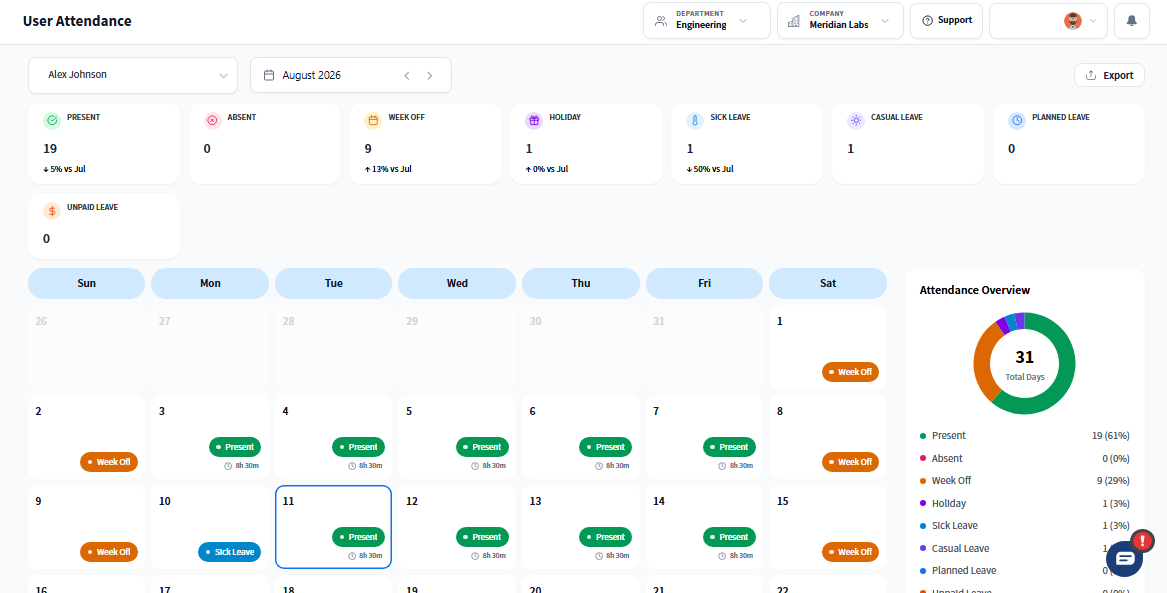
Why Prodaff Simplifies Time and Attendance Tracking
- Auto clock-in and clock-out based on desktop activity
- Real-time presence, shift adherence, and work alignment tracking
- Break and idle time detected passively — no manual input required
- Exportable attendance logs for payroll, HR, and compliance
- Role-based access to maintain privacy and data security
- For HR & Finance Teams: Ensure accurate , audit-ready timesheets — synced with actual work data.
- For Managers & Team Leads: Track shift start times, late logins, and work engagement — without micromanaging.
What Employee Attendance Tracker Software Should Include
Automatic Clock In/Out
Log attendance the moment work begins.
- Clock-in via desktop app or auto-launch on login
- Timestamps recorded securely by user and machine
- No browser, manual input, or timecard errors
Attendance Linked to Work Sessions
Track not just presence — but productivity.
- Connect attendance to tasks and activity data
- Syncs with project logs and employee sessions
- Verifies whether time logged = time worked
Break & Idle Time Detection
Track breaks and idle time without manual input.
- Detects break periods using inactivity rules
- Captures lunch, coffee, or screen-off time
- Supports fair reporting and planning accuracy
Optional Screenshot Capture
Bring transparency without overreach.
- Capture only during active logged sessions
- Configurable by role or department
- Ideal for compliance, billing, and attendance audits
Role-Based, Exportable Reports
Get the right data to the right teams.
- Filter by team, user, shift, or time period
- Export cleanly to Excel, CSV, or PDF
- Compatible with third-party HR and payroll systems
Calendar & Trend Views
Spot attendance by day, team, or location.
- Daily calendar view highlights absences and gaps
- Trend charts reveal patterns over weeks or months
- Track anomalies and outliers with visual clarity
How Employee Attendance Tracking Software Works
Employees clock in automatically or with one click
The Prodaff desktop app logs attendance based on system login, ensuring zero manual steps.
Real-time presence and breaks are tracked
Idle time, task activity, and breaks are captured transparently — helping HR see not just presence, but participation.
Reports are generated by shift, team, or user
All data is role-filtered and export-ready — perfect for time approvals, payroll, or workforce audits.
What Makes Prodaff the Best Attendance Tracking Software?
| Feature | Prodaff | Typical Tools |
|---|---|---|
| Desktop-based time logging | Yes | Browser-dependent |
| Auto clock-in via desktop login | Yes | Manual or biometric |
| Shift-level reporting | Built-In | Often Missing |
| Idle & break detection | Context-Aware | Basic timers only |
| Task-linked attendance tracking | Integrated | Not Supported |
| Screenshot (optional, secure) | Configurable | Forced or lacking |
Where Attendance Tracking Fits Your Team
- 01
Remote Teams
Validate attendance across time zones and shifts, even when unsupervised.
- 02
BPO & Call Centers
Monitor shift adherence, reduce tardiness, and support SLA compliance.
- 03
Hybrid Teams
Consolidate on-site and remote attendance into one system.
- 04
Professional Services
Align hours worked with billable time logs and client reporting.
- 05
Finance & Admin
Ensure timesheet accuracy for audits and cost recovery.
Frequently Asked Questions
Yes — Prodaff's employee attendance tracking software automatically clocks employees in and out based on desktop login and system activity, so there's no manual clock, no biometric hardware, and no browser step required.
Break and idle time are detected passively using inactivity rules — the software recognizes lunch, coffee, or screen-off periods without employees logging anything manually. That makes it a genuinely useful employee time and attendance tracking software for planning accuracy, since break patterns show up automatically instead of being self-reported.
Yes. Attendance logs export cleanly to Excel, CSV, or PDF and are compatible with third-party HR and payroll systems, so approved hours flow straight into payroll without re-entry. It's built to work as connected employee attendance tracker software, not an isolated log HR has to reconcile by hand — you can test the integration with a free employee attendance tracker software trial before rolling it out company-wide.
No. Access is role-based, so only the people who need attendance data — HR, finance, or a direct manager — can see it, and reports can be filtered by team, user, shift, or time period before sharing. This keeps the best employee attendance tracking software transparent for oversight without exposing personal data company-wide.
Yes. Attendance is tracked at the shift level, so teams working staggered shifts or spread across time zones — remote, hybrid, or BPO — get accurate, per-shift adherence data instead of one blended daily total. It's built as employee time and attendance tracking software for distributed, multi-shift workforces from the ground up.
Ready to get started?
Try Prodaff for free and see how easy it is to track time, boost productivity and manage teams with confidence.