

Freelancer Time Tracking for Independent Professionals
Prodaff empowers independent professionals to log time effortlessly, deliver proof of work, and streamline reporting — without micromanagement or manual entry.
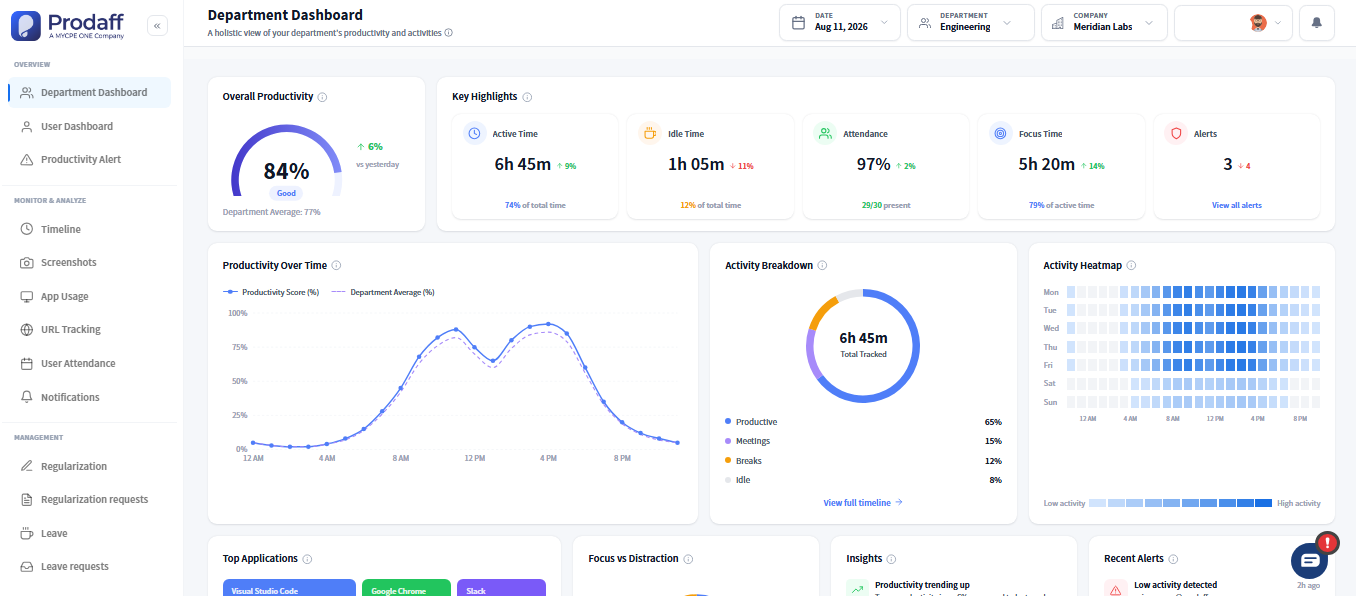
Built for Professionals Who Bill by the Hour
- Track hours automatically across clients and tasks
- Generate export-ready reports with zero extra effort
- Visualize focus, productivity, and downtime
- Deliver proof-of-work with confidence and clarity
- Run silently in the background — no popups or distractions
For Designers, Developers, Consultants & Creatives
Track billable hours effortlessly and deliver proof of work with confidence.
For Virtual Assistants & Contractors
Log time silently across projects and share client-ready reports with full privacy control.

Core Features of Freelancer Time Tracking
Silent Background Tracking
Run once, forget it. Prodaff captures every minute automatically.
- Auto-launches and tracks silently
- No need to start/stop timers manually
- Doesn’t interrupt your flow
Multi-Project Tagging
Organize your day without switching tools.
- Tag time by project, deliverable, or client
- Ideal for juggling multiple workstreams
- Supports granular reporting
Effort & Focus Metrics
Understand your productivity and optimize future work.
- Track deep focus vs fragmented time
- Detect distractions or burnout signals
- Improve project planning with data
Exportable, Branded Reports
Send clients professional proof of time spent.
- Export timesheets in Excel, PDF, or CSV
- Schedule exports weekly or monthly
- Include breakdowns by task or client
Privacy-First Design
Respect your work. Protect your data.
- No screen capture or keystroke logging
- You control who sees what
- Fully encrypted and solo-friendly
How Freelancers Track Billable Hours by Project
Install and Launch Prodaff
Start once. Prodaff runs silently in the background, capturing every work session and client interaction.
Tag Time to Clients and Projects
Assign entries to projects, tasks, or deliverables. Stay organized without spreadsheets or timers.
Export and Share Reports
Deliver polished, branded reports to clients automatically or on demand — proof-of-work, done right.
Where Freelancers and Consultants Use Prodaff
- 01
Designers & Creatives
Track creative cycles and time-to-deliverable
- 02
Software Developers
Capture sprint effort and task-level time
- 03
Virtual Assistants
Export clean logs for billing and agency transparency
- 04
Writers & Content Teams
Log research, drafting, and revisions
- 05
Business Consultants
rack phases tied to client contracts or strategy sessions
What Independent Professional Tools Should Include
| Feature | Prodaff | Manual Tools |
|---|---|---|
| Auto Background Tracking | Yes | No |
| Multi-Client Project Tagging | Yes | Manual Effort |
| Branded Client Reports | Built-In | External Tools |
| Focus & Productivity Metrics | Built-In | Not Available |
| Privacy-First Defaults | Encrypted | Risk of Overreach |
Frequently Asked Questions
Yes — simply tag each time entry with the client or task name.
Absolutely. You can export clean reports or share live links.
Not at all. Prodaff runs silently in the background.
No — Prodaff focuses on precise time tracking and reporting.
Prodaff is available on Windows and Mac desktop environments.
Ready to get started?
Try Prodaff for free and see how easy it is to track time, boost productivity and manage teams with confidence.