

Quick answer:
Most employee monitoring software promises the same thing: more visibility, less wasted time, better accountability. Here's the part most buying guides skip. The software that actually works in 2026 isn't the one that captures the most data. It's the one your team doesn't resent using.
This guide breaks down what employee monitoring software actually does, what it costs in 2026, how the leading platforms stack up, what US law requires before you turn it on, and how to match the right tool to your team size and industry, so you can make the call with real numbers instead of vendor pitches.
What Is Employee Monitoring Software?
Employee monitoring software is any application that records how employees use their work time, ranging from simple time clocks to detailed activity trackers that log app usage, idle time, and screenshots. Most platforms fall into two broad camps: time and attendance tools that focus on hours worked, breaks, and payroll accuracy, and activity monitoring tools that track what employees are doing on their devices throughout the day.
The market has grown quickly alongside the shift to remote and hybrid work. Multiple industry research firms place the current global market in the billions of dollars, with most forecasts pointing to double-digit annual growth through the end of the decade as more mid-sized companies adopt cloud-based tools that were once reserved for large enterprises.
How Does Employee Monitoring Software Work?
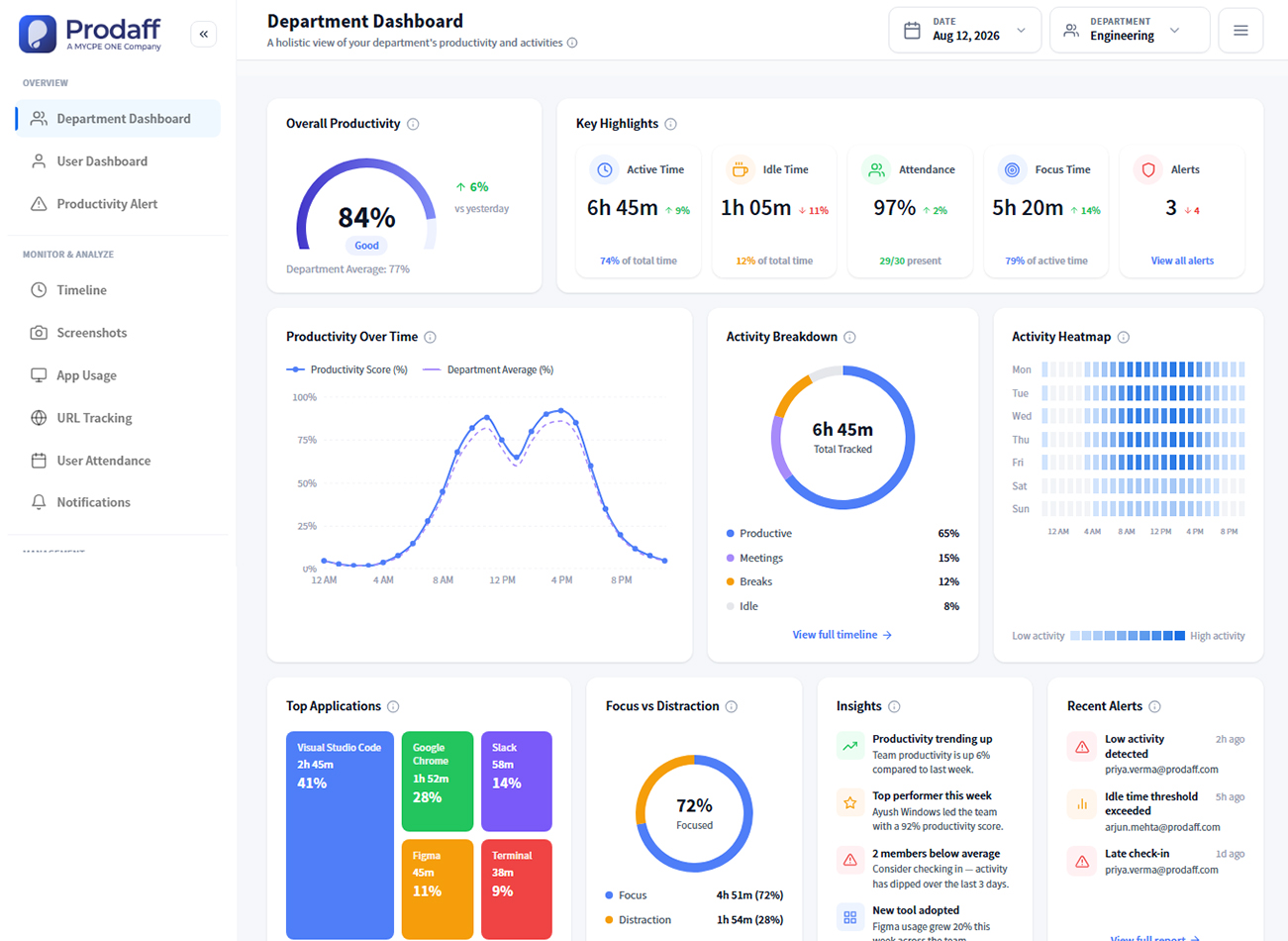
Most platforms install a lightweight desktop or browser agent that runs in the background during work hours. That agent collects data such as clock-in and clock-out times, active versus idle periods, application and website usage, and in some cases periodic screenshots. The data flows into a dashboard where managers can view individual and team reports, maintain accurate records of hours worked, export timesheets for payroll, and spot patterns like consistent overtime or underused software licenses.
Newer platforms, including Prodaff, focus less on raw surveillance data and more on task alignment. Instead of showing a manager a screenshot feed, they show how time spent relative to assigned tasks and projects gives a clearer picture of output without requiring anyone to review individual screen activity.
How Much Does Employee Monitoring Software Cost in 2026?
Pricing generally scales with how much activity data a platform captures.
| Tier | Typical price per user/month | What it usually includes |
|---|---|---|
| Free or basic time tracking | $0 to $5 | Clock in/out, timesheets, basic reporting |
| Mid-tier productivity tracking | $6 to $10 | App and website usage, idle time, project tracking |
| Full activity monitoring | $10 to $20+ | Screenshots, keystroke logging, detailed activity scoring |
| Enterprise/insider threat | Custom pricing | Advanced security monitoring, compliance reporting, admin controls |
Most small and mid-sized businesses land in the $6 to $10 per user range, which covers time tracking, project-level reporting, and productivity insights without the higher cost or employee pushback that comes with screenshot-heavy tools. Annual billing typically brings a 15 to 20 percent discount over month-to-month pricing across most vendors in this category.
What Are the Best Employee Monitoring Software Tools in 2026?
The right tool depends on whether your priority is strict activity surveillance, simple time tracking, or a balance of the two that supports performance conversations without feeling invasive.
| Platform | Best for | Monitoring approach | Starting price |
|---|---|---|---|
| Prodaff | Teams that want productivity insight without surveillance | Real-time time tracking, task alignment, activity insights, configurable screenshots | Contact for pricing |
| Hubstaff | Distributed teams needing GPS and time tracking | Time tracking, screenshots (optional), GPS for field teams | Free tier; paid from ~$7/user/mo |
| Time Doctor | Agencies and BPOs billing client hours | Time tracking, activity levels, website/app monitoring | From ~$7/user/mo |
| Clockify | Budget-conscious teams needing simple time tracking | Manual and automatic time tracking, minimal activity data | Free tier; paid from ~$4/user/mo |
| Teramind | Enterprises with insider threat and compliance needs | Full activity monitoring, keystroke logging, behavior analytics | Custom/enterprise pricing |
Prodaff is built for organizations that want detailed productivity visibility without relying on covert surveillance. It combines time tracking, task alignment, activity insights, idle-time detection, and configurable screenshot capture to give managers clearer context around how work gets done.
Employee Monitoring vs. Time and Attendance Tracking: What's the Difference?
Time and attendance tracking answers a narrower question: when did an employee clock in, clock out, and take breaks, and is that data accurate enough to run payroll? Employee monitoring software answers a broader question: what was the employee doing during those hours, and how productive was that time?
Many platforms, including Prodaff, Hubstaff, and Time Doctor, now blend both functions into one product. The practical distinction that matters for buyers is depth of activity data. A pure time and attendance tool logs hours. A monitoring tool adds a layer of behavioral and productivity data on top of those hours, which is where cost, complexity, and legal considerations increase.
What Features Should You Look for in Employee Monitoring Software?
- Accurate time tracking with manual and automatic clock-in options.
- Project and task-level reporting that ties hours to output, not just activity.
- Payroll and invoicing integrations to reduce manual data entry.
- Clear, exportable reports that HR and finance can use without extra formatting.
- Configurable monitoring depth, since not every role or team needs the same level of tracking.
- Transparent employee-facing dashboards, so staff can see their own data rather than feeling tracked from a distance.
- Compliance features that support state notice requirements, such as built-in disclosure prompts or audit logs.
Is Employee Monitoring Software Legal in the US?
Yes, in nearly every state, as long as the monitoring occurs on company-owned equipment for a legitimate business reason. Federal law under the Electronic Communications Privacy Act generally allows employers to monitor activity on systems they own and provide to employees.
As monitoring tools become more sophisticated, workplace surveillance and employee privacy concerns have also become a broader part of the public conversation.
However, a small but growing number of states require advance written notice before monitoring begins. As of 2026, Connecticut, Delaware, New York, and Colorado have specific statutes requiring employers to disclose electronic monitoring in writing, and Connecticut recently expanded its requirements to include the specific locations where monitoring may occur, effective October 2026. States without a dedicated notice law generally still allow monitoring without employee consent, though clear internal policies remain the safer practice regardless of jurisdiction. Companies with remote employees across multiple states should build a single notice policy that meets the strictest applicable state requirement and apply it company-wide, rather than tracking separate rules by employee location.
How Do You Choose the Right Employee Monitoring Software for Your Team?
Start with the business problem you're actually trying to solve. A time and attendance tool like Clockify or a lighter Hubstaff plan usually covers accurate payroll and billing. A platform like Prodaff fits better when the goal is understanding where team capacity goes and improving how work is prioritized, since it centers on task alignment and output data instead of a screenshot feed most managers never review. A full monitoring suite like Teramind is built for insider threat and regulatory compliance in high-security environments.
For most CEOs, HR heads, and COOs evaluating this category in 2026, the practical filter is trust. Tools that surface productivity data transparently, and that employees can see for themselves, tend to get adopted with less resistance and produce more reliable data than tools employees feel are watching them without context.
Frequently Asked Questions
Monitoring generally refers to tracking work-related activity such as hours, tasks, and app usage for business purposes. Surveillance is often used to describe more invasive tracking, like continuous screen recording or keystroke logging, that goes beyond what's needed to manage performance or payroll.
Most mid-tier platforms charge $6 to $10 per user per month, with basic time tracking available for less and full activity monitoring suites often costing $10 to $20 or more per user.
Yes. Most modern platforms work the same way regardless of location, since the tracking agent runs on the device rather than depending on office network access.
Yes. Prodaff combines time tracking, task alignment, activity insights, and configurable screenshot capture to help organizations understand productivity while maintaining transparency and role-based control.